Wearables Track. Agents Decide. I Built the Missing Context Layer with OpenClaw
Tuesday morning, Feb 12. My phone buzzes at 7:30 AM:
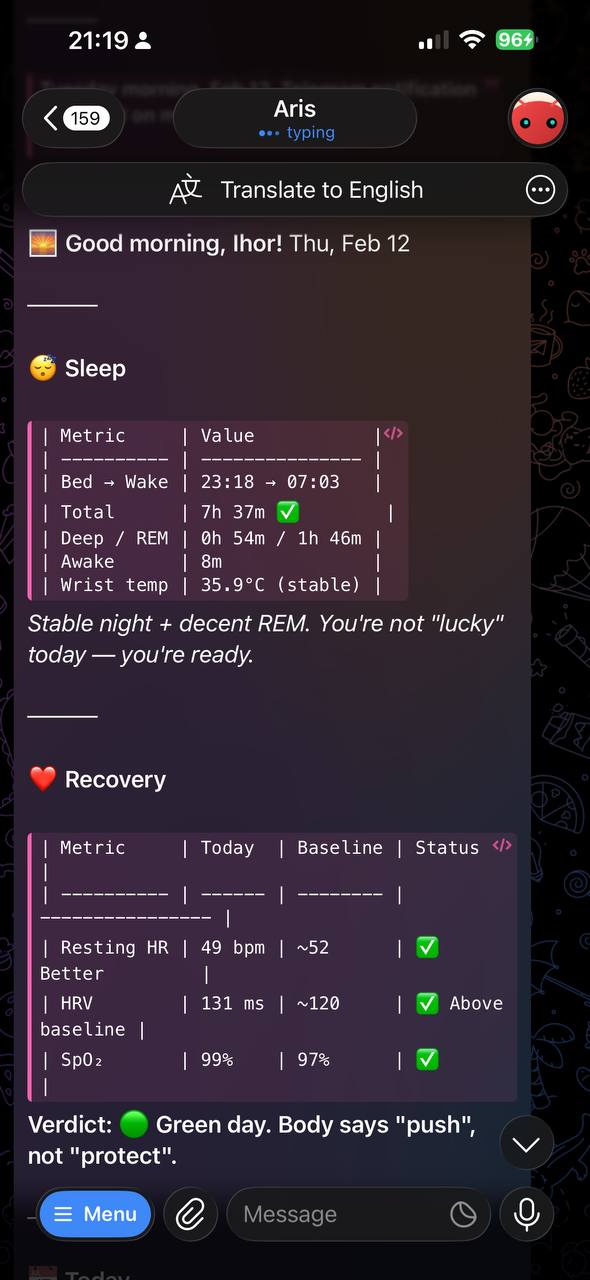
I get out of bed before checking anything else.
This didn’t come from Whoop. It came from an agent I built on top of my Apple Watch data, the one that knows my calendar, my baselines, and my schedule.
Think about it. Dashboards provide metrics, but we actually derive value when that data is connected to the broader context of our lives. What we are doing, when and why
If you got a morning message like the one above, what would your agent remind you about today? Tiny questions like that can reveal what really matters right now. For example, imagine your agent reminding you after a rough night of sleep: “Your first meeting is at 10:00, try a short walk before starting work.” Prompts like that one, shaped by your real data and calendar, help you make smarter choices throughout your day.
This post shows exactly how I built it.
Two Years With Whoop
Whoop is a great product. I used it for two years, and it taught me things about my body that I couldn’t have learned otherwise.
The first two months, I was obsessed. I was tracking diet, journaling workouts, chasing green recovery days. It felt like too much, and it was! But that experience gave me a unique perspective, and it was teaching me counterintuitive things: walk more to recover, design gym routines that leave you better the next day, not wrecked, recovery is always active and almost never passive. I never would have found those patterns on my own.
After two years, I’d distilled it to four rules: sleep better, manage stress, actively restore, and train. Those rules are mine. I don’t need the app to remind me of them.
So, I canceled my subscription.
What I couldn’t replace was something Whoop never had: active intelligence. How can I train and recover better this week while pushing a new feature to our users and preparing to give a speech at an event? When does it make sense to do? And where?
That’s the thing about any wearable in the market. They don’t know my context and can’t coach me in a way that works specifically for me. Whoop was giving me a score and suggestion, but it couldn’t say “Your recovery is shit and you will have a tough day, make sure to have a long walk today and go to the sauna tomorrow”. Whoop’s journals track what happened if you don’t feel too lazy to fill them. It doesn’t shape and guide what should be done next.
That gap is what I built.
Why OpenClaw (or any other autonomous agent)
I could do it with any other agent or just curling to the Claude API. It would never work so well, though, because it would not have access to the broader context about me.
That’s what makes OpenClaw useful here:
Stateful workspace. OpenClaw agents have a persistent workspace. Health files, baselines, and context are all accessible across sessions. No database setup, no state management code.
Scheduling built-in. Morning briefing, stress sentinel, and cleanup jobs are all first-class cron jobs in the config. I didn’t write a scheduler.
Connectors. Calendar, Telegram, and others are all connected to the same agent. The morning briefing naturally crosses sources: health, calendar, and workload in one prompt.
Composable agents. The briefing agent, stress sentinel, and cleanup agent are separate concerns. Each has its own prompt and schedule. No code required to compose them.
Memory as a first-class concept. Baselines, user preferences, and learned patterns live in workspace files that the agent can read and update. Persists across restarts.
The intelligence flywheel. OpenClaw agents accumulate proprietary context: calendar patterns, baseline trends, past decisions, communication style, and goals. That context compounds. The agent that’s been running for three months knows you better than one that’s been running for a week, and no generic product can replicate that, because that data is yours and lives locally.
This is the moat that wearables can’t copy. Not the sensors. The context.
Solution
If you want to replicate my setup, the easiest way is to point your agent to this article and to the following repo: github.com/ihorkatkov/health-agent. Here, my agent and I have laid out in plain text what needs to be done to make it work specifically FOR YOU. It’s hard to build a general AI solution for everybody, so just use the one as the starting point.
How it works:
The architecture is simple by design, with three main parts.
Data layer. Apple Watch tracks the metrics. Health Auto Export is a $5 app that pushes a JSON snapshot to a lightweight webhook server on your home machine every few hours. The server writes timestamped files that your agent reads during the briefing.
Context layer. The agent reads those files at 7:30 AM, checks your calendar, and produces a briefing. Instead of averaging your HRV or sleep against generic population data, it compares everything against your own trends. This you-to-you approach catches your real progress, setbacks, and actual needs, because the best baseline for your body is your personal history, not the average of thousands of strangers. This allows the agent to spot when you’re adapting, struggling, or need recovery before you would notice. If you are using an Apple Watch, you can get this data directly from it. Those numbers become the agent’s frame of reference.
Morning briefing. The morning report follows a structure I specified in MORNING_REPORT.md. The agent reads health data, tracks goals, checks my calendar, and looks into memories. It crunches data and generates the report, which it sends to Telegram.
If your calendar looks overloaded and your recovery is low, it tells you straight. If stress levels rise during the day, it sends a ping to remind you to slow down.
Final Thoughts
Apple Watch tracks vitals. My agent decides what to do with them.
Two years of data distilled to four principles: sleep better, manage stress, actively restore, and train. Once internalized, you don’t need the teacher. You need something that applies those rules to your actual Tuesday, your calendar, your dinner at 19:00, and your four meetings.
Dashboards show you what happened. Agents decide what to do next.
An agent who knows you. $5 and an hour. That’s it.
Enjoy Reading This Article?
Here are some more articles you might like to read next: